Personnel Software

Whatever order is handed over today will be a burden on your HR team tomorrow; Didgah combines printing and electronic signatures with automated calculations and accurate outputs, making files instantly accessible and keeping you one step ahead of any legal changes. With customizable formulas for issuing any type of contract, automatic deadline reminders and seamless integration with time and attendance and payroll, Didgah keeps all your personnel information centralized, transparent and always up to date.

Share
Core HR Features
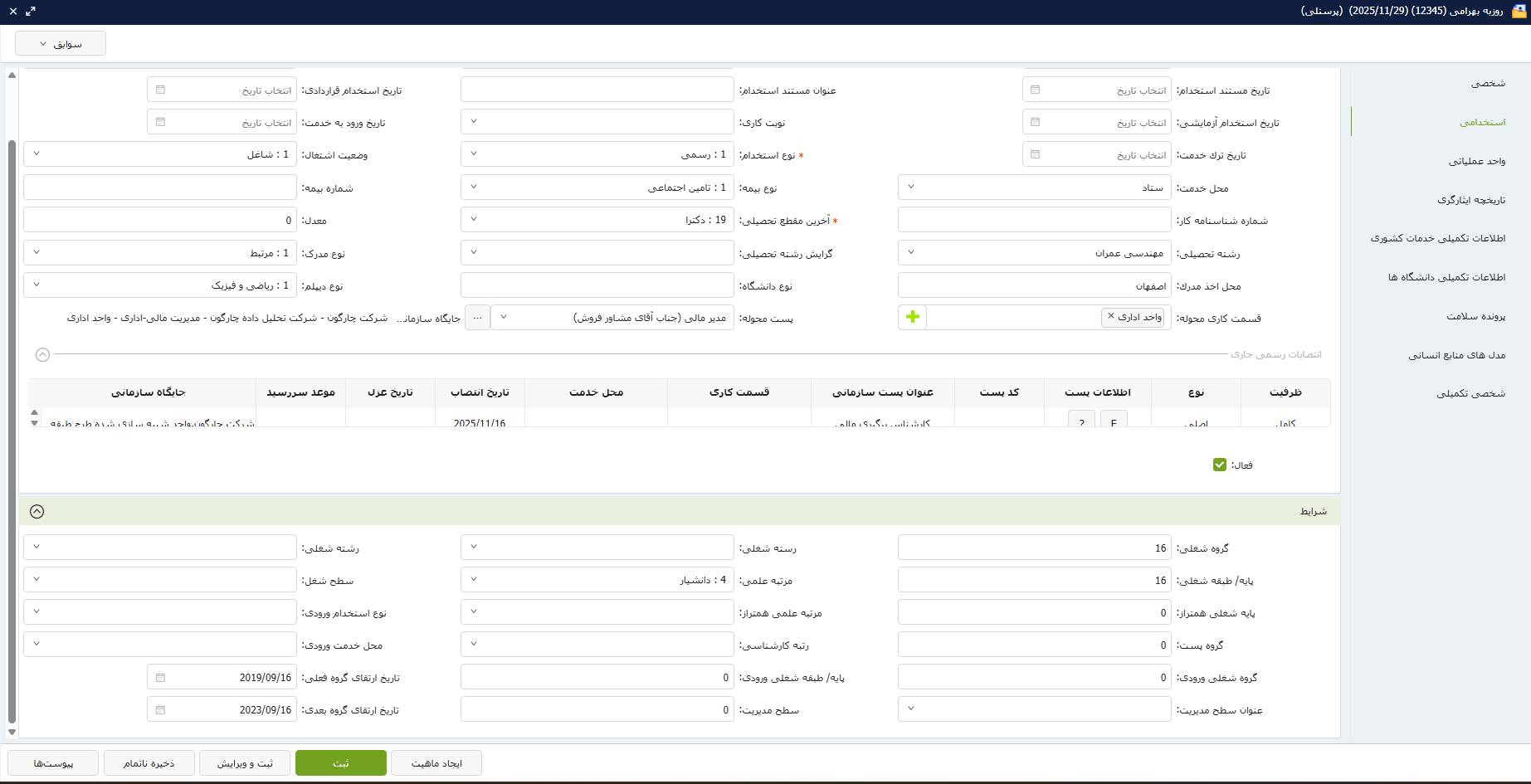
  • Recording, maintaining and managing personnel data

    This feature allows you to store, edit and maintain complete personnel information with periodic registration and provides a separate subject archive for data classification. Work history, training courses, points and other relevant information are automatically collected and calculated, and personnel can personally enter their information and complete their online file. Also, personal files such as national ID card scans and birth certificates are securely stored in the system, which ensures ASA access and data protection.

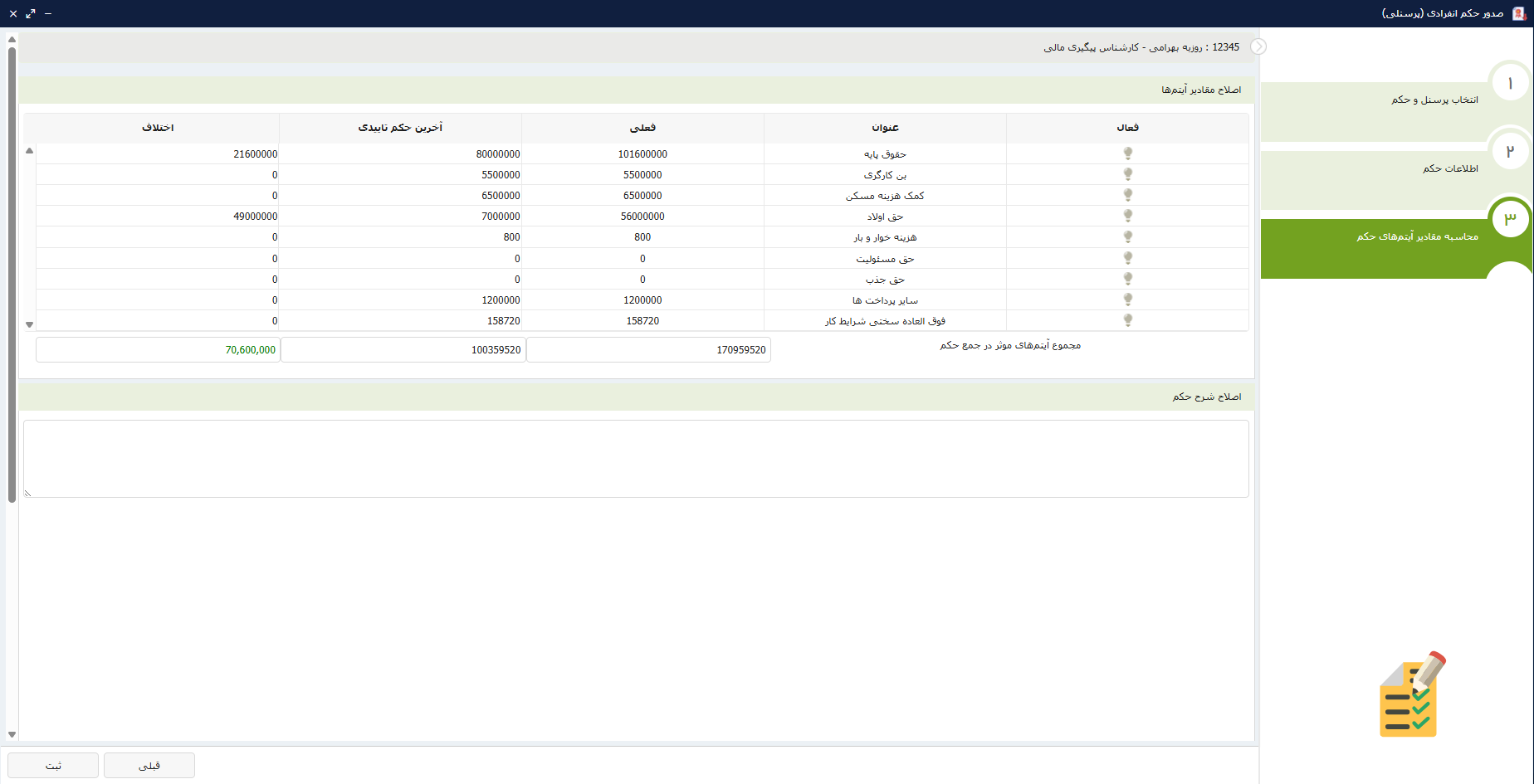
  • Calculation and Issuance of Orders and Contracts

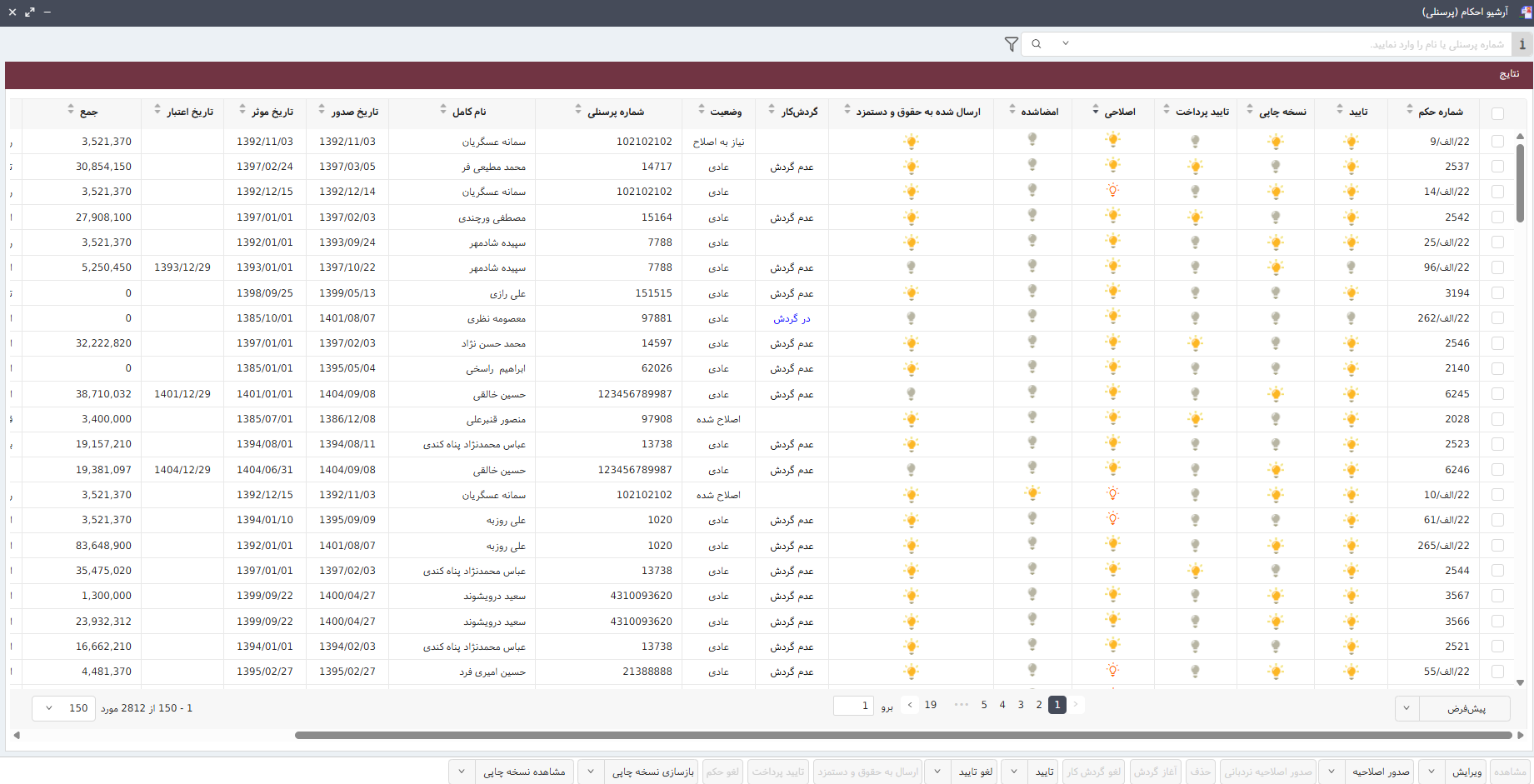
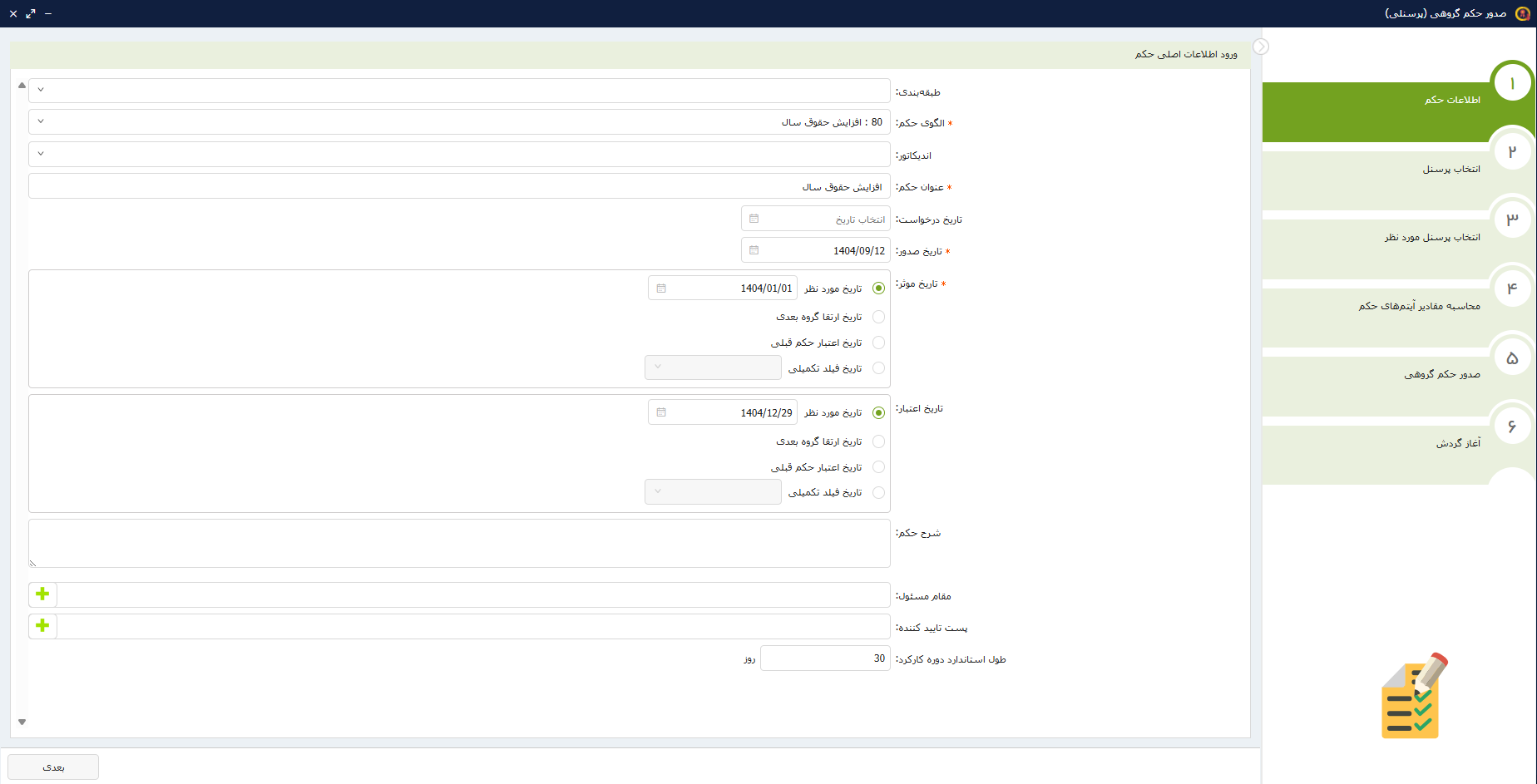
    This capability supports a variety of complex calculations related to specific contracts and orders without legal or organizational restrictions and offers the possibility of issuing them individually or in groups along with electronic signatures. The issuance and signing process is managed with all security steps and approvals, and dynamic structures for job classification, ranks, and ranks can be designed in the organization. In addition, the required amendments to various orders are automatically and quickly generated and recorded so that HR operations can proceed without interruption.

  • Reminders, statistics and reports

    The system allows you to define smart reminders for key events such as promotions, contract terminations or important occasions and provides statistical and analytical reporting tools in various formats such as PDF, Excel and Word. The archive of records, legal forms and rulings is available with high security and quick access, and there is the ability to import and update information in groups, even via Excel files, which speeds up the organization's information processes.

  • Additional features and system connections

    In addition to the main features, this software provides greater flexibility with comprehensive management of personnel files and issuing and electronic signing of orders and contracts. Reminding important events and statistical and analytical reports in various formats, along with the ability to enter and update information in groups, meets the needs of large organizations. Support for new rules, custom archive design, and adding additional fields to files, along with API service and connection to other systems, has made this system an integrated and expandable solution for human resources management.

Solve Some of the Usual Challenges with Personnel Software
  • Variety of Employment Models and Contracts

    Large organizations are faced with a variety of contract models: government, private, petrochemical, banking, holding and other specialized industries. This diversity in physical conditions or legacy systems causes delays, errors, and waste of time in issuing rulings.

    Didgah’s dynamic and unlimited formulating tool allows you to easily and transparently implement a variety of employment models, rulings, and calculations for any organization with any legal structure.

  • Non-standard document storage

    Currently, personal documents such as national ID scans, educational certificates, and organizational records are stored in different, paper-based systems. This fragmentation makes it difficult to search, access, and update this information.

    Didgah HR software saves organizations from leafing through paper files in vain. The system's digital archive allows you to store all personal and organizational files in a neat, searchable and secure environment. Creating custom fields also covers the specific needs of each organization.

  • Reliance on support for changes

    In many systems, even a small change in a calculation formula or workflow requires a visit to the support unit. This slows down decision-making and creates constant dependence on the technical team.

    Didgah HR software enables organizations to independently manage changes. After initial training, HR managers can update formulas and processes without having to coordinate additional work distances. This autonomy takes a lot of pressure off support teams during busy office days.

  • Compliance with constantly changing laws

    Employment laws and regulations are constantly changing. Manually updating formulas and reports in legacy systems is time-consuming and error-prone.

    Didgah’s architecture is designed for change from the ground up. With user-friendly tools, the system enables the implementation of any new law in minutes.

  • Migrating legacy data without errors

    Manually entering data from Excel files, paper documents, or forgotten systems is time-consuming and can lead to repeated errors. Organizations often face large volumes of historical data that are challenging to analyze and manage.

    Batch data entry via Excel into the software eliminates this pressure. Didgah HR software transfers previous data to the system simultaneously and without errors and provides automatic data migration planning for the future.

  • Indirect access of employees to documents

    Employees constantly need access to their orders, contracts and personal records; but in current systems, this access is limited to HR staff or requires in-person visits.

    Each employee in Didgah has a dedicated secure dashboard where they can view their contracts and orders electronically, download them and even perform electronic signatures. This tool speeds up the process of personnel interaction with the organization and eliminates the need for physical presence.

  • Unreliable deployment in the organization

    There are many concerns about the software deployment process: “Is a thorough analysis done?”, “Did we get practical training?”, “Are the system support staff experts?”

    Chargoon takes the deployment process through precise and transparent steps: organizational needs analysis, customized implementation, performance testing and validation, user training, final delivery, and ongoing support. With the Chargoon team by your side, this process is transparent and you are informed every step of the way.

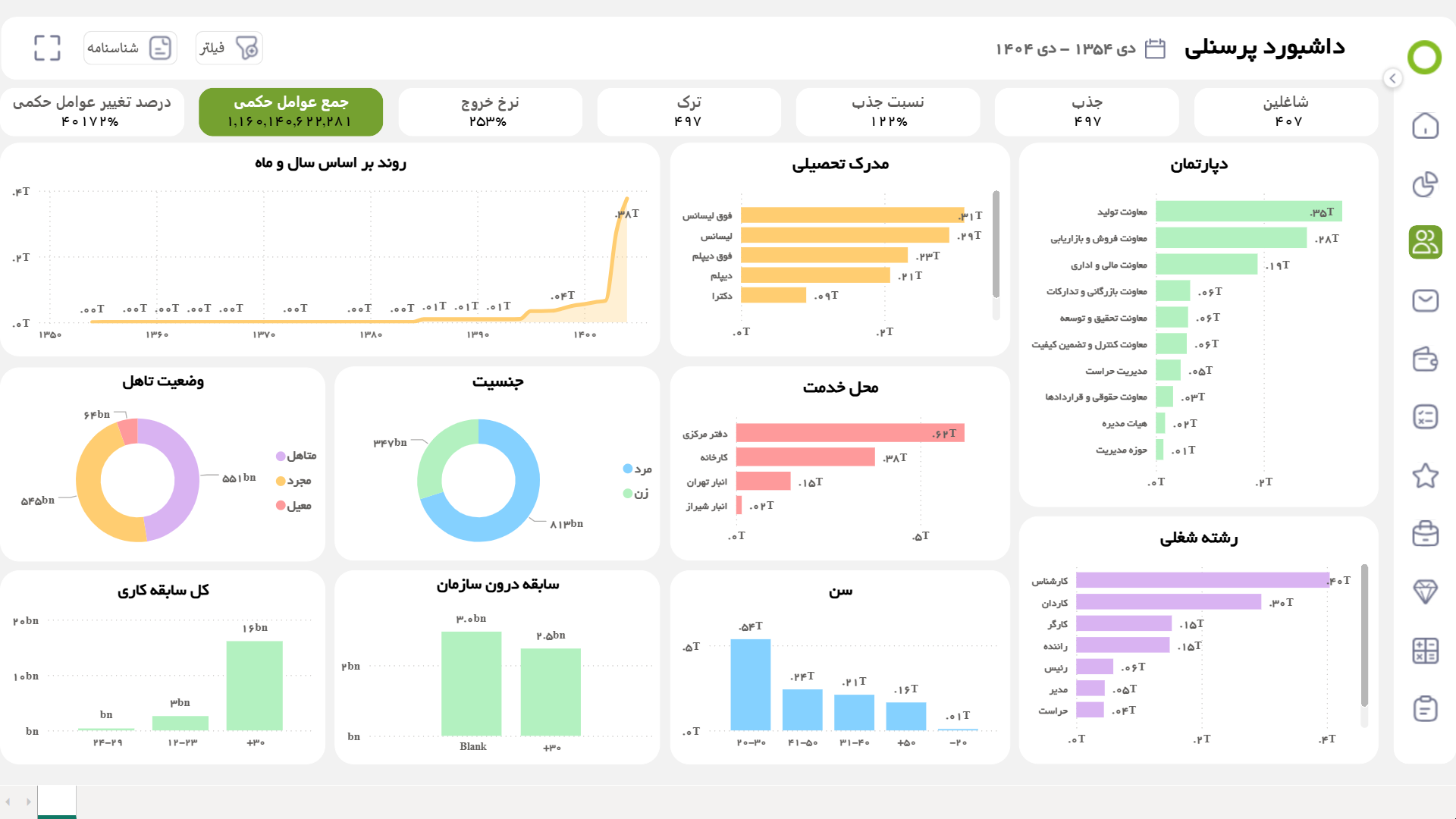
Core HR BI Dashboards
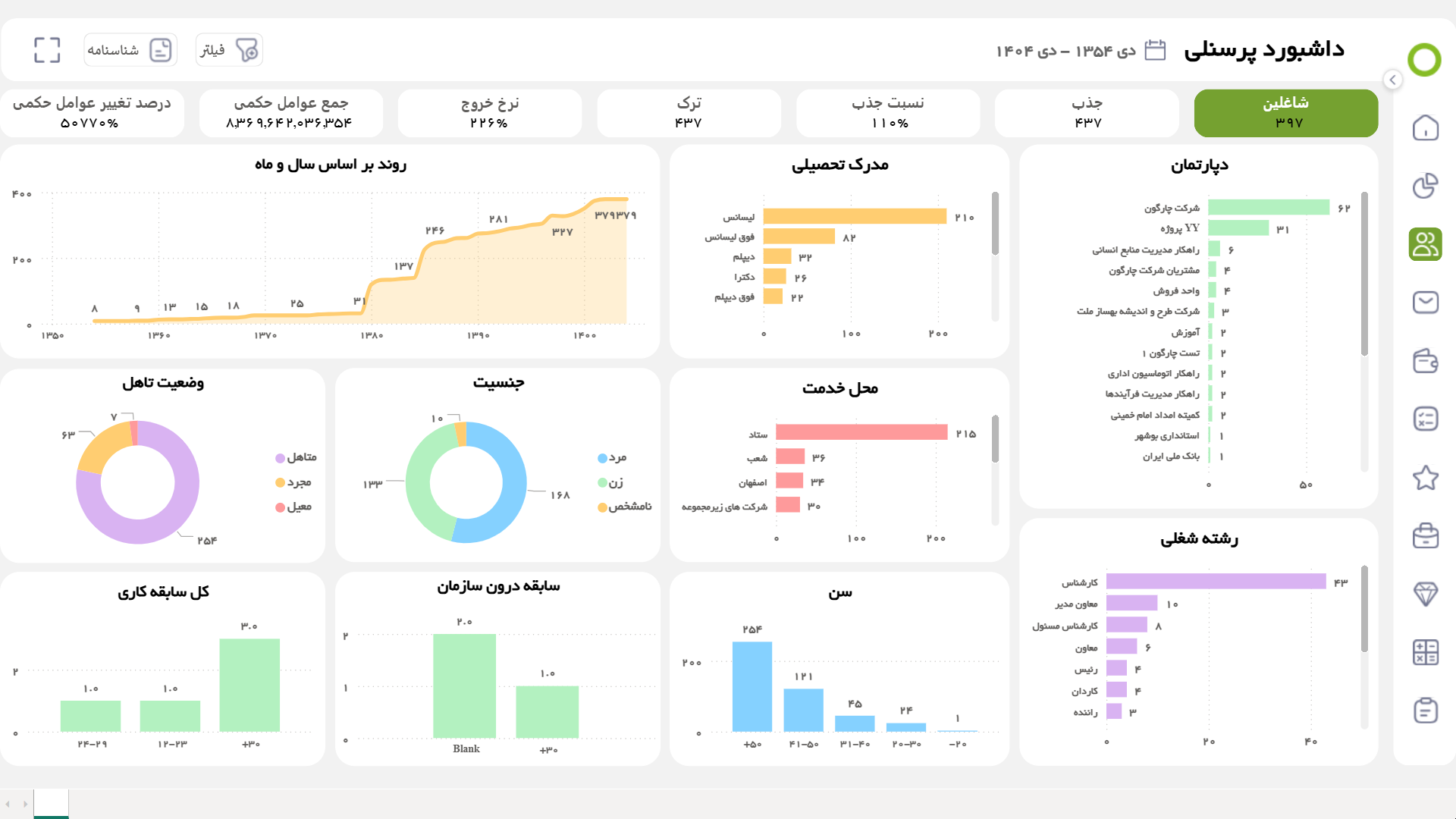
  • Employee Dashboard
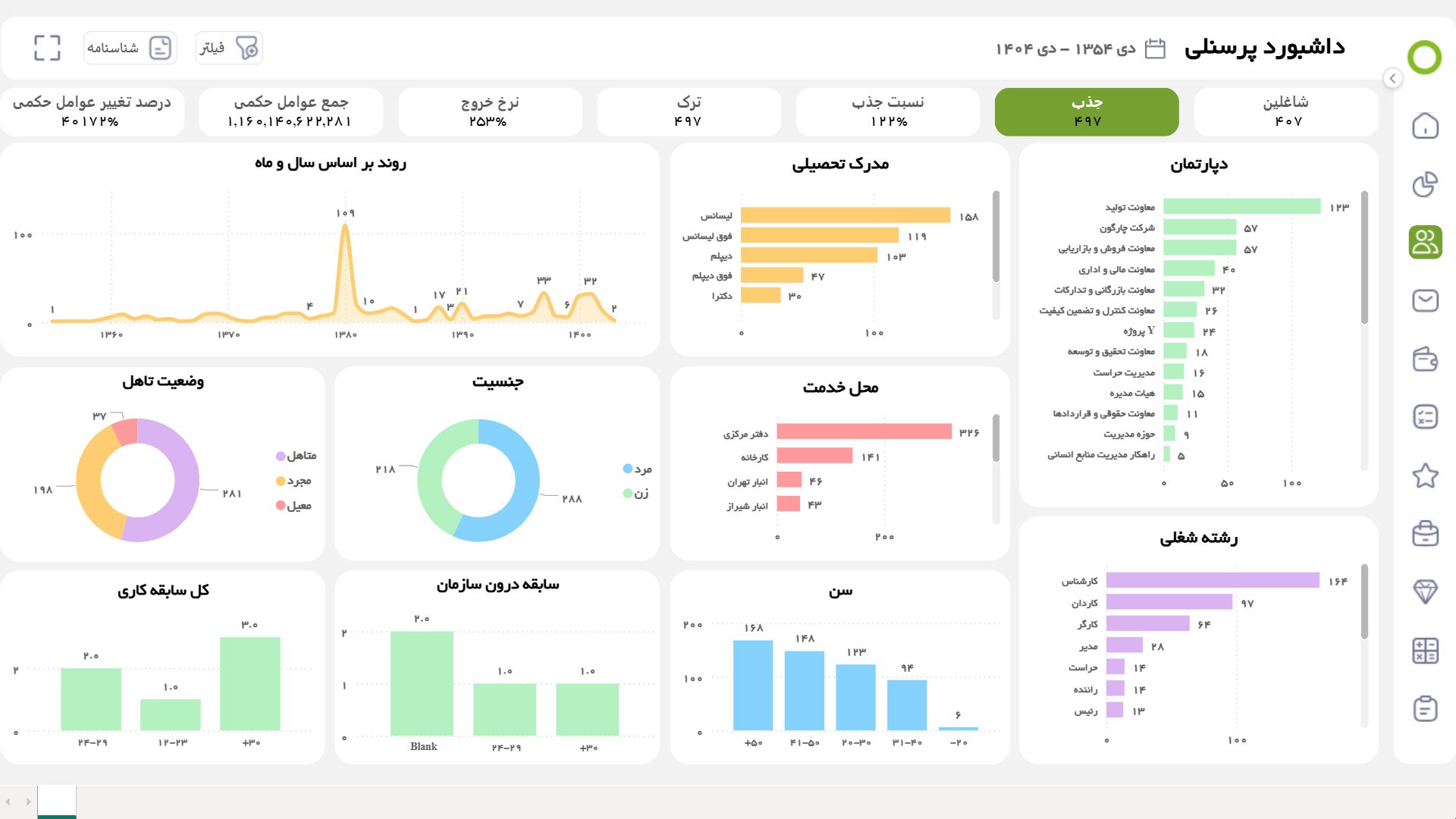
  • Recruitment Dashboard
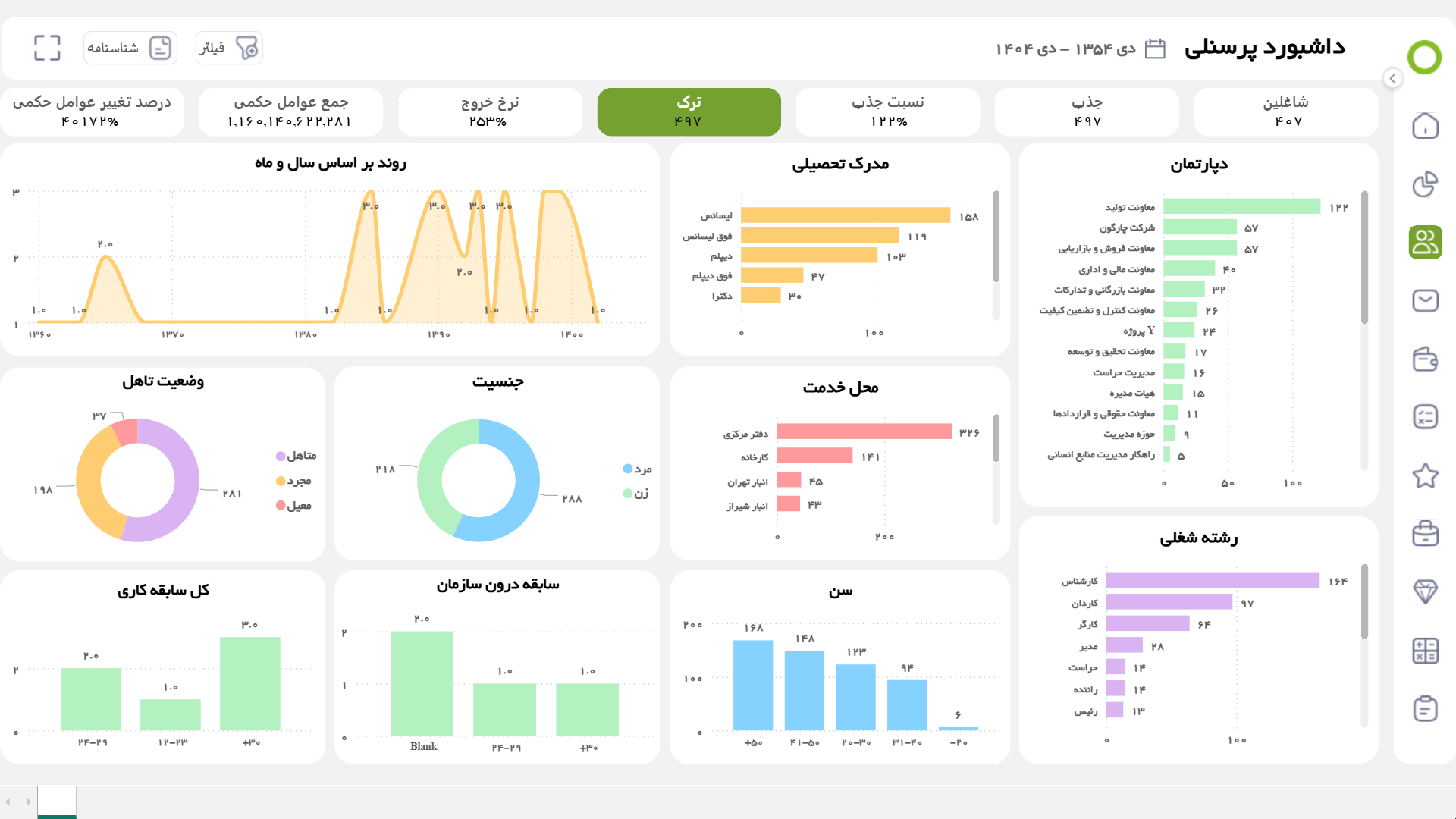
  • Attrition Dashboard
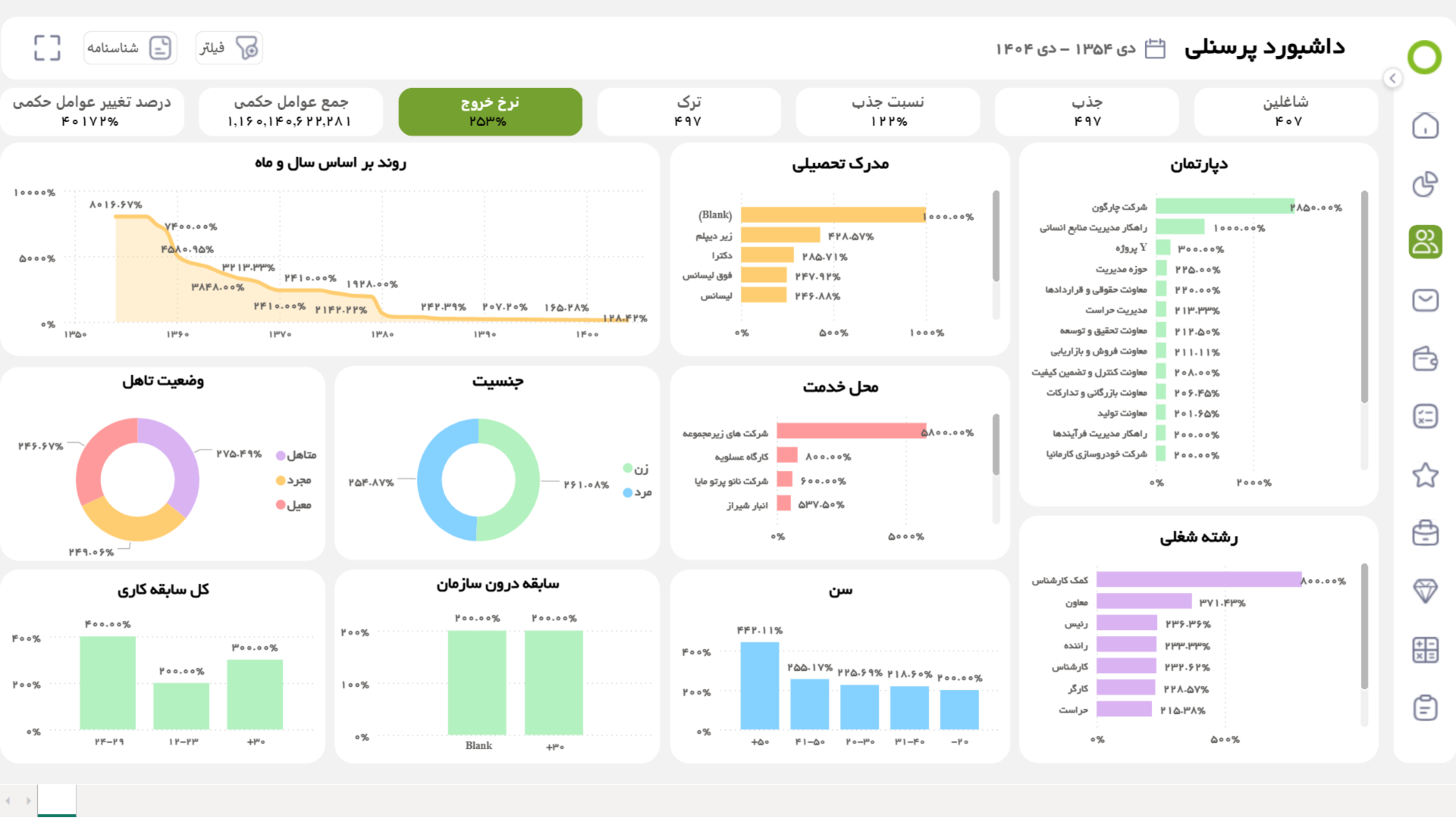
  • Attraction Ratio and Exit Rate Dashboard
  • Sum of Order Factors and Its Change Ratio Dashboard
  • Employee Dashboard

    This dashboard provides a comprehensive picture of the organization's employees; from the number of employees in different time periods to work history, education, job category, department, location, age, gender, and marital status. This data enables important analyses; including identifying employees who are close to retirement, examining the rate of employee retention, identifying densely populated areas, assessing the gender ratio in units, and monitoring the growth or decline in the number of employees. Such an analytical view of human resources helps the organization plan more accurately for the acquisition, development, and retention of human capital.

  • Recruitment Dashboard

    This dashboard provides a comprehensive picture of the trends and characteristics of new hires. Indicators such as the number of recruitments by time, work experience, education, job category, department, place of employment, age, gender, and marital status help the organization analyze recruitment patterns more accurately.

    Based on this data, important management insights can be achieved; including identifying peak and recession times for recruitment, analyzing the average and age balance of new recruits, identifying growing or high-attrition sectors, and examining the suitability of individuals' education with the organization's real needs. These analyses play an important role in human resource planning, preventing staff accumulation or shortages, and improving the quality of the recruitment process.

  • Attrition Dashboard

    This dashboard examines employee turnover and employee turnover patterns. Data such as the number of employees leaving the organization over time, their work history, education, job title, department, location, age, gender, and marital status are provided to provide a detailed picture of why and how employee turnover is occurring.

    By analyzing this information, it is possible to identify peak times of employee turnover, measure the possible relationship between age and marital status with employee turnover, identify departments with the highest turnover, and understand whether employee turnover occurs more among new hires or experienced employees. These insights help the organization plan to improve employee retention, strengthen the onboarding process, and provide targeted incentives.

  • Attraction Ratio and Exit Rate Dashboard

    This dashboard allows you to analyze employee recruitment and departure per capita. Indicators such as recruitment and departure ratio over different time periods, work and internal experience, education, job category, department, place of employment, age, gender, and marital status are presented to form an accurate picture of human resource dynamics.

    By analyzing this data, you can identify the trend of an organization becoming larger or smaller, measure changes in the recruitment and departure ratio over time, and examine the turnover rate; A rate that shows how employee turnover affects costs, the workload of current employees, and the need for replacement.

  • Sum of Order Factors and Its Change Ratio Dashboard

    This dashboard allows you to analyze the amount of compensation an organization pays its employees and its trends over time. Indicators such as total compensation, work and internal experience, education, job category, department, location, age, gender, and marital status are displayed to provide an accurate picture of the compensation pattern.

    By analyzing this data, you can compare the distribution of salaries across departments, measure the fairness of pay based on work experience, examine the impact of education and marriage on salaries, and monitor changes in pay across departments over time, a feature that helps you make more accurate decisions in the area of payroll management.

Deployment and Support Services

Chargoon, with a companion approach to software deployment, provides a smooth and uncomplicated experience for customers. From inception to full deployment, the Chargoon team stands by organizations every step of the way to ensure the software is serving their goals and needs.

After deployment, Chargoon support continues with prompt responses and uninterrupted service. This commitment to companionship and reassurance creates an environment where customers can focus on developing and improving their organization with peace of mind.

  • Core HR Integrations with Other Software
  • Attendance and Absence Software

    Synchronizing Traffic Data for Accurate Work Records and Service Calculations

  • Payroll Software

    Using Legal and Benefits Information to Complete Personnel Files and Analyze Personnel Status

  • Welfare Software

    Connecting Welfare Services Data to Manage Employee Benefits and Perks

  • Training Software

    Adding educational and skill records to the file for employee evaluation and promotion

  • Dedicated Personnel Counter

    Personal environment for viewing, receiving and signing online orders and contracts with complete security

  • System Integration with API

    Connection to external systems such as finance and office automation via web service

  • Performance Appraisal Software

    Transferring results and scores Assessment to Personnel File

  • Asset Management Software

    Automatically Reconcile Asset Responsibility with Personnel Information

To make a smart choice, consider all aspects

  • Can Didgah personnel software support all recruitment models of my organization?

    Yes, the advanced formula writing tool easily supports all contract and regulatory models.

  • Can I store and manage custom or customized information in the software?

    Yes; you can create additional fields and archive any type of data you want.

  • Do I need to contact Chargoon support to make changes to the calculation formulas?

    No; the formula writing tool is simple and user-friendly, and after training, your organization's system administrator can easily make changes.

  • How can I make sure that the personnel software keeps up with the constant changes in regulations and laws?

    The personnel software architecture is completely dynamic and quickly adapts to the latest changes.

  • How can I transfer our old records and archives to the personnel software?

    You can easily enter or update personnel data in bulk and quickly via Excel file.

  • How can my staff view and sign their documents online?

    Through the Didgah personnel counter, it is possible to view, download and even sign all types of orders or contracts.

  • What exactly are the steps involved in the software deployment and implementation process?

    These processes include needs analysis, implementation, testing, training and final delivery, which are carried out by the Chargoon team located next to you.

Demo request

  • This field is for validation purposes and should be left unchanged.