Meeting Software

From In-Person to Online Meetings

Every meeting should produce something, a decision, a solution or an idea that moves the organization forward. But the reality is that many meetings just take time. Didgah meeting software changes this process. The meeting is held at a time that suits everyone, the agenda and files are prepared in advance, and decisions are on track the same day. With Didgah meetings, from in-person to online (audio and video), from coordination to conclusion, everything runs smoothly and effortlessly.

Share
Meeting Management Features
  • Meeting coordination; simple, fast and accurate

    Integration into the organization's calendars, systematic checking of free times and management of invitations and responses, makes meeting planning possible in the shortest possible time and makes the coordination process simpler, faster and more accurate; so that everyone is on a common schedule without additional round trips.

  • Organizational Calendar and Access Management

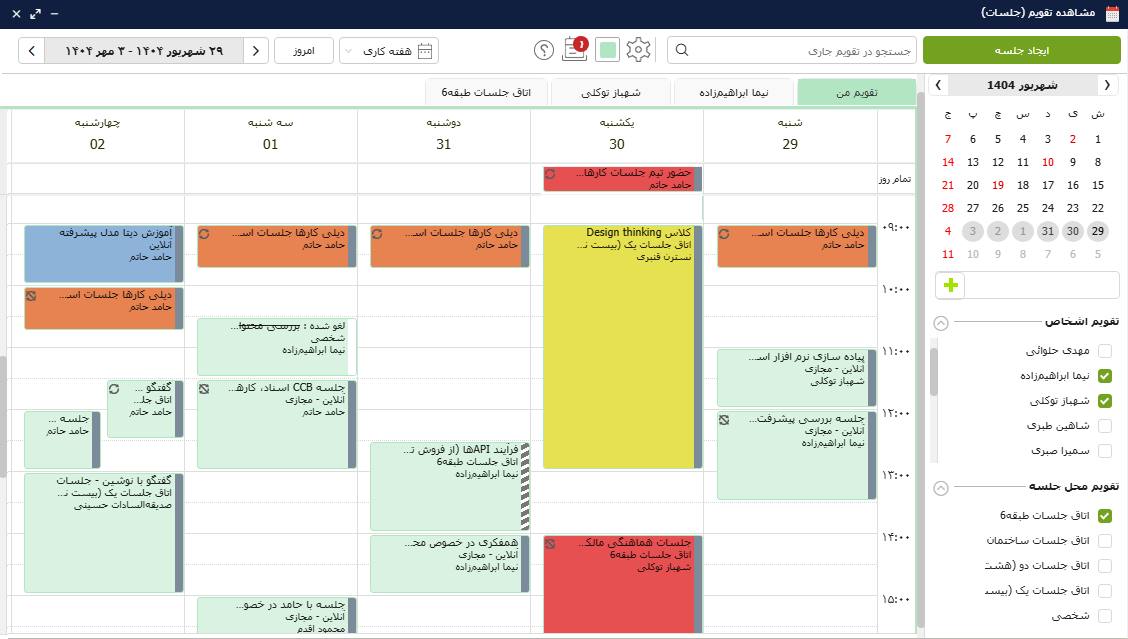
    Organizing and coordinating meetings becomes easier with a smart and shareable organizational calendar. Meeting and calendar management can be delegated to office managers or selected users for more efficient tracking and planning. Official occasions, holidays, and organizational events are displayed in the calendar to prevent overlaps and duplication. The calendar also supports a variety of daily, weekly, monthly, and work views to match users' needs and work styles.

  • Location management and meeting and event types

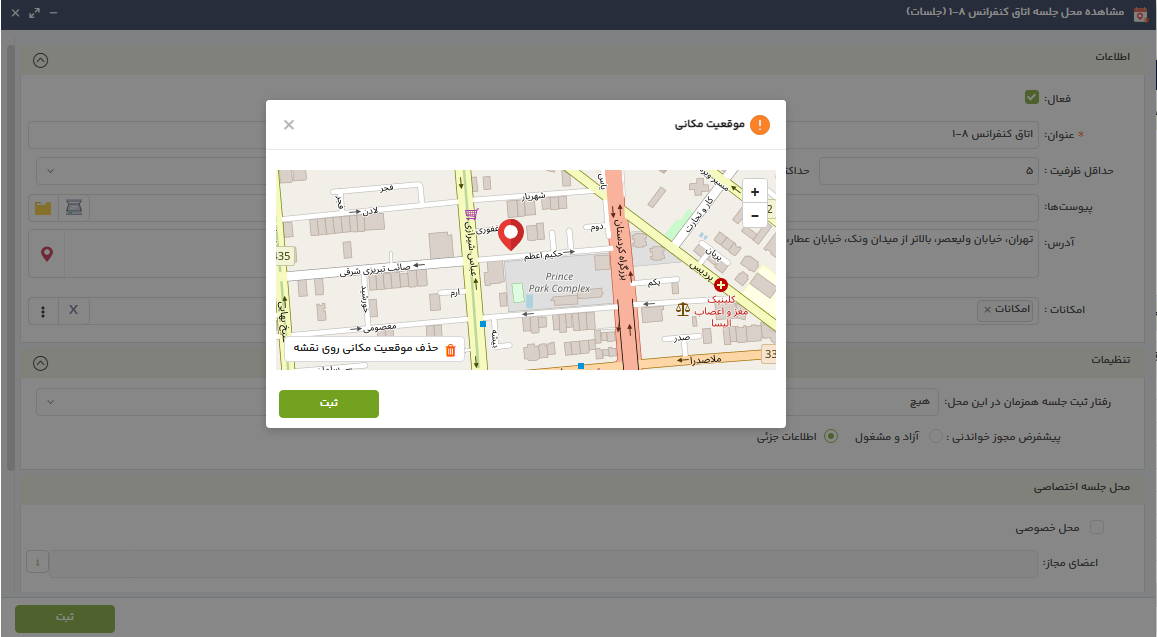
    Meeting locations can be defined and categorized as permanent, temporary, internal, or external, and information such as addresses, required resources, coordinates, and related files can be recorded for each location. Reservations for these locations are made intelligently and prevent schedule conflicts by checking capacity and empty times. Meeting types can be defined based on the organization's needs (in-person, virtual, hybrid, etc.), and customizable invitation and meeting minutes templates can be designed and used for each type of meeting.

  • Didgah Voice and Video Call Service

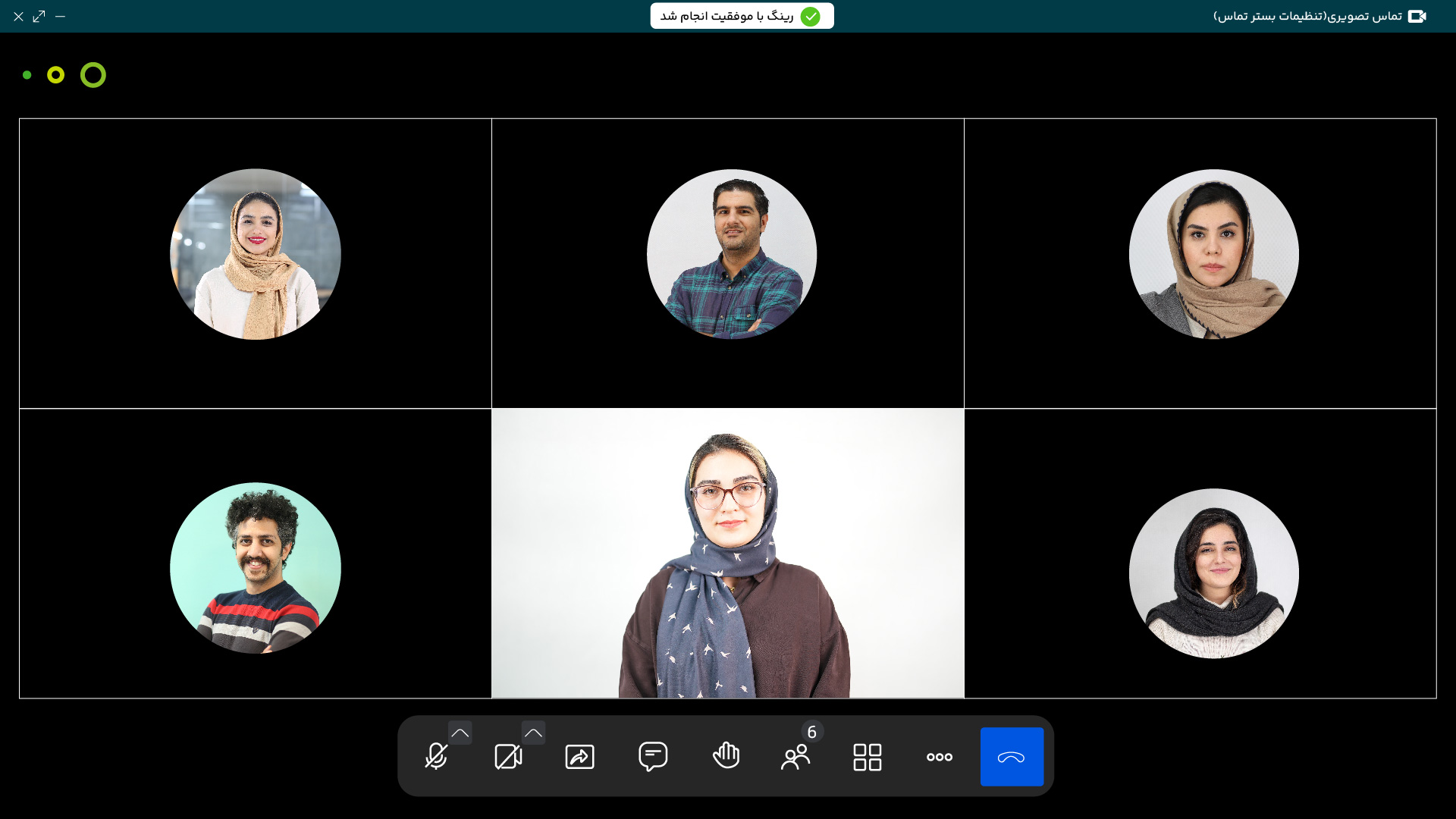
    With the integration of the online call platform, Didgah provides secure, professional and seamless virtual communications. High-quality audio and video calls are accessible via a web browser without the need to install software, and only people invited by name and position can enter meetings. The ability to share screens and whiteboards simplifies collaboration in corporate meetings and interviews. All data is hosted on your servers, providing unparalleled security, and this service makes virtual communications safe, simple, flexible, and low-cost.

  • Minutes and digital signature generation

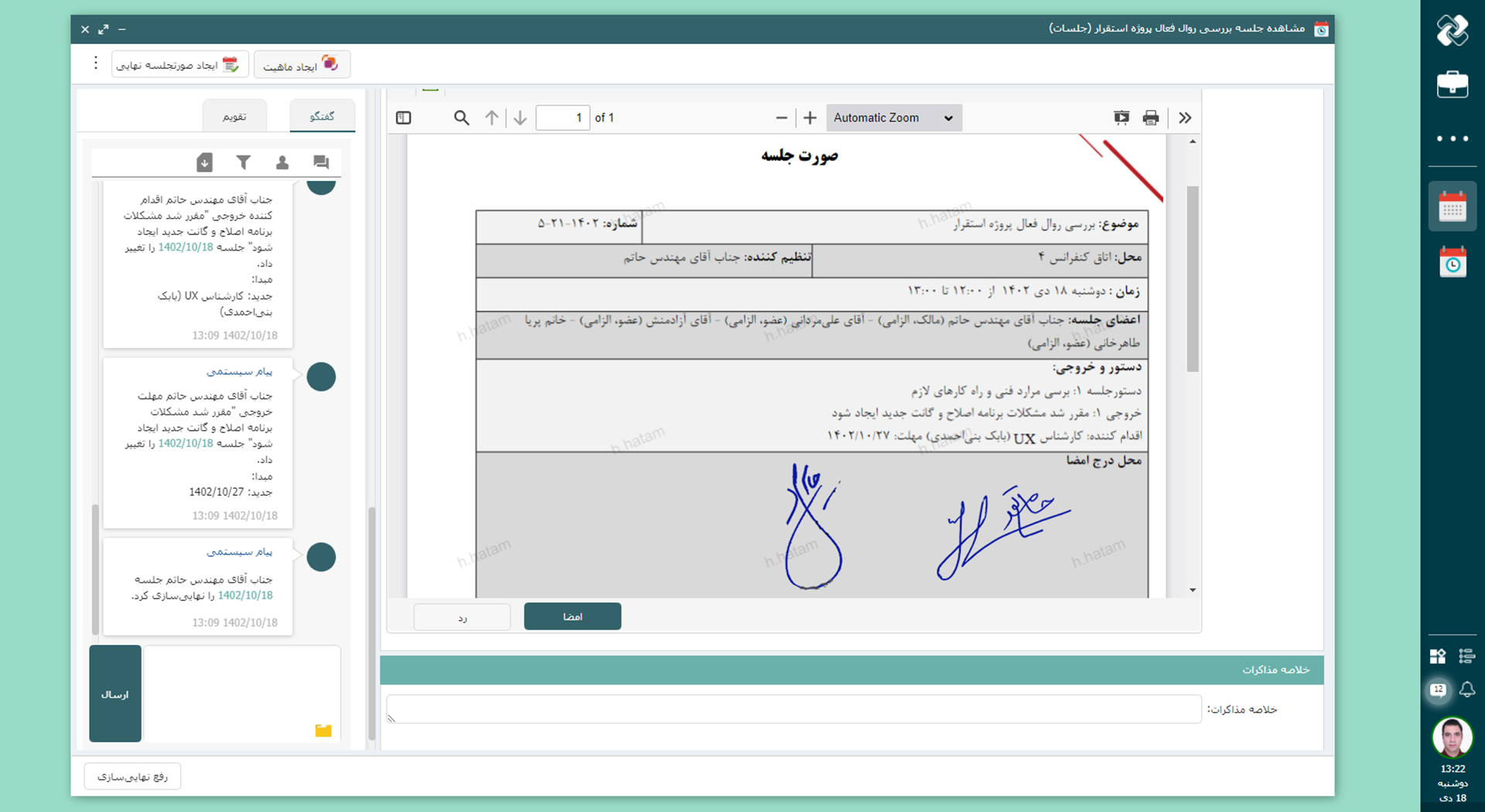
    The process of generating minutes is carried out by automatically collecting orders, conversations and decisions based on predefined organizational templates, and its output is prepared in a coherent and standardized manner. These minutes can receive manual or in-person signatures, as well as digital transmission via the cart for electronic signature. Signatures are recorded with a guarantee of the authenticity and authenticity of the document, and the system allows tracking the status of signatures and sending automatic reminders in the cart.

  • Tracking Meeting Actions

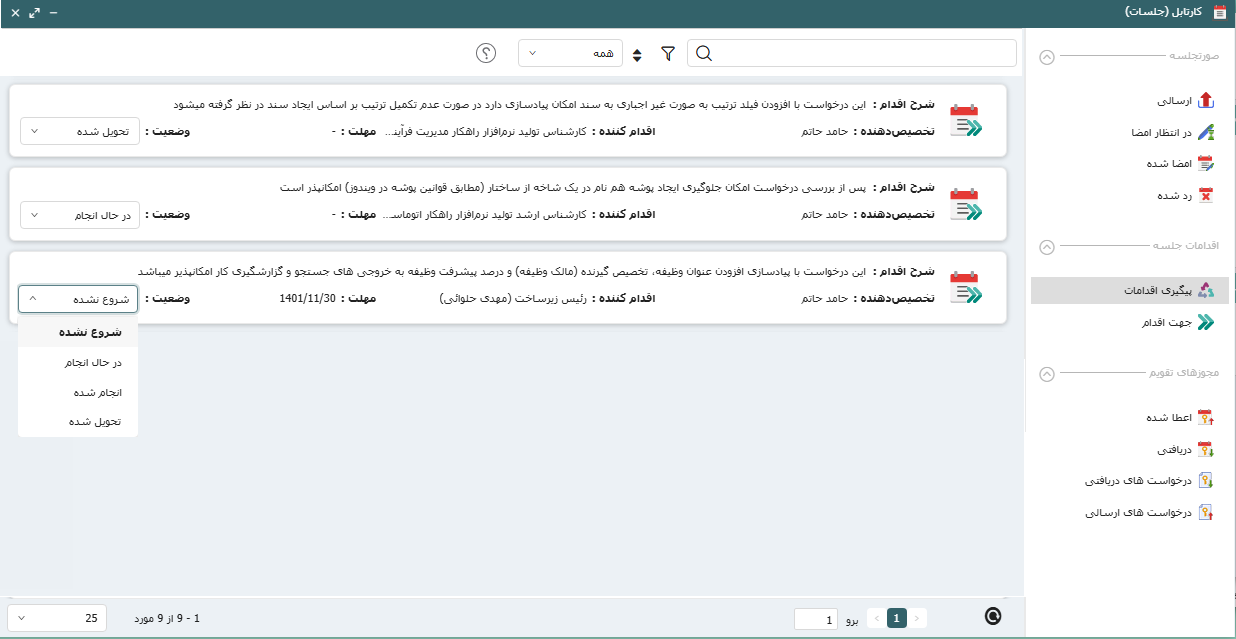
    The actions recorded in the meeting minutes are displayed with a specific status in the meeting taskbar, and users can view, filter, and manage their progress. The system also sends automatic reminders to ensure that tasks are completed on time. If the organization uses "tasks" software, these actions are easily converted into projects or tasks and are fully tracked in the same environment. This connection integrates task management and meeting decision tracking across the organization.

  • Meeting widgets; A clear view of three vital parts of meetings

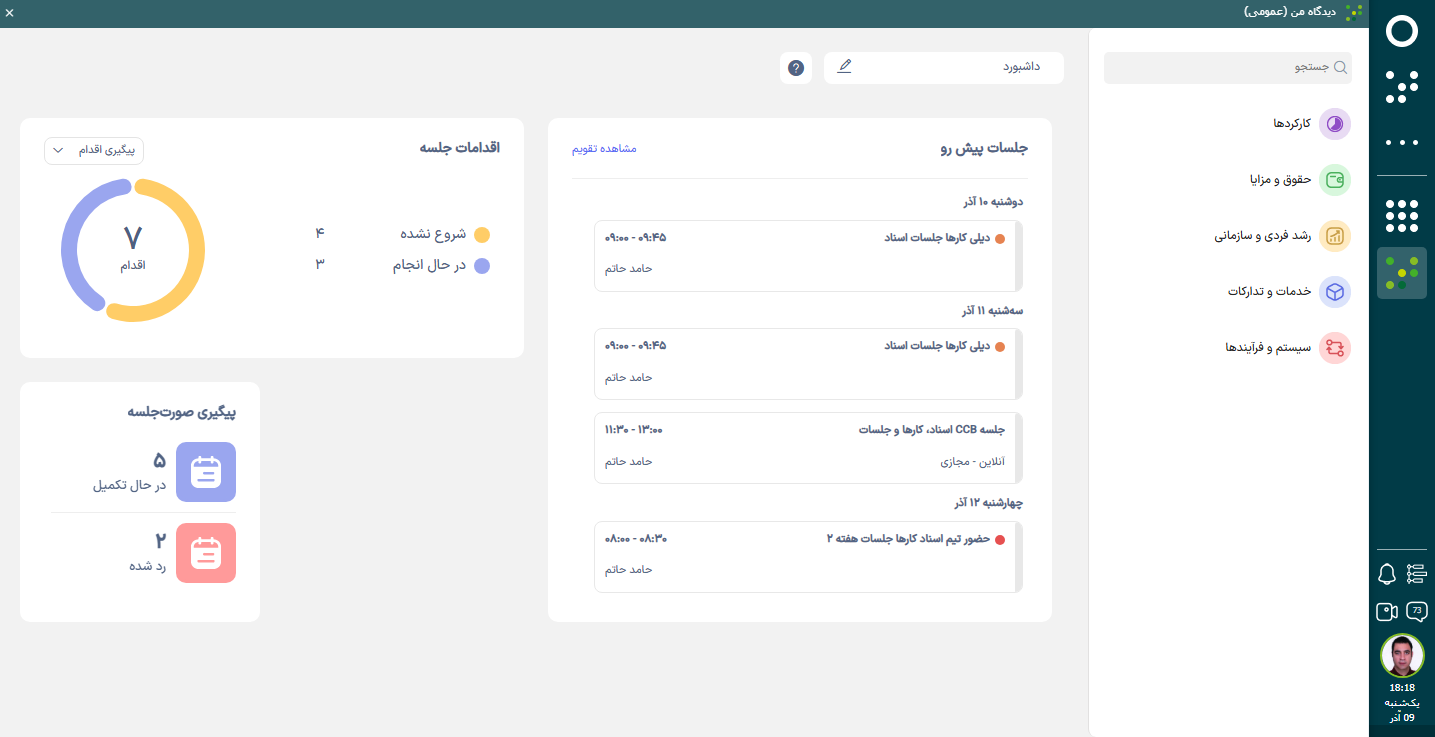
    These widgets display three main parts of the meeting cycle in one place: Upcoming meetings provide a schedule, Action tracking shows the status of decisions, and Minutes tracking shows the process of preparing and approving minutes. The user has an accurate picture of the status of the meetings without going to different sections and can follow up faster.

Common Organizational Challenges and How Meeting Management Addresses Them
  • Meeting Coordination Issues

    In many organizations, when scheduling a meeting, there is no real-time, accurate view of people’s calendars and locations. This can lead to a meeting being scheduled at a time when a key person or location is unavailable, which can lead to the meeting being moved, delayed, or canceled.

    By providing a unified view of people’s calendars and meeting locations, meeting software allows for real-time visibility of people’s availability and location status, helping the coordinator schedule the meeting at a time and place that is free from disruption.

  • Inconsistency in Meeting Invitations, Responses, and Hosting

    In many organizations, the process of inviting a meeting, receiving participant responses, and knowing the final time is not managed in a unified manner. This inconsistency leaves some people unaware of the meeting status, time changes, or the certainty of its holding.

    Meeting software, by centrally managing invitations, recording and displaying the status of participants' responses, and sending system reminders, makes the entire process from invitation to holding a meeting transparent and coordinated; so that everyone is informed of the meeting status at the right time.

  • Participants are not prepared and meeting outcomes are incompletely recorded

    In many organizations, the meeting agenda is not determined before the meeting and decisions or outcomes of the meeting are recorded sporadically. This causes people to enter the meeting unprepared, discussions to proceed sporadically, and the meeting outcomes remain incomplete or ambiguous.

    With the ability to define and send meeting agendas in advance and record meeting outcomes and decisions, meeting software ensures that all participants arrive at the meeting fully prepared and that decisions are recorded in a coherent and trackable manner.

  • Delays in producing and approving minutes

    In many organizations, minutes are not produced immediately after the meeting or are time-consuming to record. In addition, the process of approving and signing minutes is often lengthy and manual, which delays access to outputs and reduces the effectiveness of meetings.

    With the ability to quickly produce structured minutes and a digital approval and signing process, meeting software minimizes the time required to record and approve meetings. This feature makes all decisions and resolutions quickly accessible and trackable.

  • Not following up on meeting decisions and resolutions

    In many organizations, meeting decisions and resolutions are recorded but not followed up after the meeting, and responsibility for their implementation is unclear. This causes decisions to remain solely on paper and the outcome of the meeting is not realized in practice.

    Meeting software makes the follow-up process transparent by allowing specific actions to be recorded, assigning responsibility and deadlines for each meeting decision, and providing a task sheet for each user. In this way, meeting decisions are converted into actionable actions and each person can manage their responsibilities and tasks at a glance.

  • Inability to search for details of past meetings

    In many organizations, after meetings, it is not possible to search and access the exact details of the discussions, decisions and orders of each meeting. This makes reviewing previous topics time-consuming, information is scattered and important decisions are missed.

    Meeting software makes it simple and reliable to access important past information by recording the minutes and decisions in a structured manner and allowing for detailed search in the fine details of each meeting. In this way, each person can quickly find all the discussions related to a topic or decision and prevent information from being lost.

  • Lack of access to meetings and reminders outside the office

    In many organizations, users can only view their invitations, responses, minutes and work schedule when they are behind the system. This makes coordination difficult, and people who are out of the office or on the go can be left behind in meeting changes and important actions.

    The meeting software with a dedicated mobile version and integrated calendar allows you to view invitations, responses, minutes, daily agenda and receive system reminders anytime, anywhere. This way, users always have access to meeting information, are ready to attend the meeting and do not miss any important action.

Complete Experience of a Successful Meeting with Didgah Meeting Software
Didgah Meetings Mobile App

The Didgah Meetings mobile application, while maintaining the structure and features of the web version, provides a complete and smooth meeting management experience on the phone. Users can view, record, and edit their meetings, see the attendance status of invitees, review outputs and approvals, and even view and follow up on meeting minutes at any time and place.

This version takes advantage of the hardware capabilities of the smartphone to make recording and documenting ASA meetings easier. The user can record audio or video directly during the meeting and attach the generated file to the meeting or save it as an output. This feature is very useful for in-person, field or off-site meetings and increases the accuracy of information recording.

The Meetings application keeps the information flow synchronized with other Didgah software and allows the user to track the actions related to each meeting or convert approvals into tasks in the "Tasks" software. The result is a simple, secure and continuous experience of meeting management that allows managers and employees to make decisions and follow up without time and place constraints.

Chargoon, with a companion approach to software deployment, provides a smooth and uncomplicated experience for customers. From inception to full deployment, the Chargoon team stands by organizations every step of the way to ensure the software is serving their goals and needs.

Services

After deployment, Chargoon support continues with prompt responses and uninterrupted service. This commitment to companionship and reassurance creates an environment where customers can focus on developing and improving their organization with peace of mind.

  • Meeting Management Integrations with Other Software
  • Office correspondence software

    Convert meeting minutes into drafts and send them for follow-up with a single click.

  • Documentation Software

    Convert important meeting minutes into an official document and archive them in the organization's digital archive.

  • Tasks Software

    Directly record task-related meetings and convert their approvals into "tasks" so that their progress can be managed.

  • Recruitment and hiring software

    Record interview sessions directly in the system and save their records in the candidate file.

  • Other Didgah Software

    Create related entities such as files or projects in other software based on the content of the session.

  • Software Other Than Didgah

    Call and attach files and documents related to the subject of the session from other systems.

To make a smart choice, consider all aspects

  • What services are offered after preparing the meeting software?

    After the provision of the software, the Chargoon support team provides services including installation and commissioning, user training, technical support and periodic software updates.

  • How can I contact the Chargoon support team?

    You can contact Chargoon support team via phone number, email or online support portal.

  • What is the process of deploying meeting software?

    The deployment process includes the steps of requirements analysis, software design and implementation, testing and evaluation, and finally user training and final delivery.

  • How long does it take to deploy meeting software?

    The deployment time depends on the complexity and volume of the organization's needs, but usually ranges from a few weeks to a few months.

  • Can the meeting software be integrated with other systems?

    Yes, this software can be integrated with office correspondence software, documents, etc. and can be coordinated with existing systems in your organization.

Demo request

  • This field is for validation purposes and should be left unchanged.